-
Platinum Edition
Please Read Before Downloading Any Files
- Clicking the file link for the respective machine will automatically download the zipped programming files. Each browser is different, we suggest using the web browser you are most comfortable with, to help you locate the file fast.
- Create a dedicated software folder on your desktop.
- Once you have located the correct zip file, extract those files to your newly created folder.
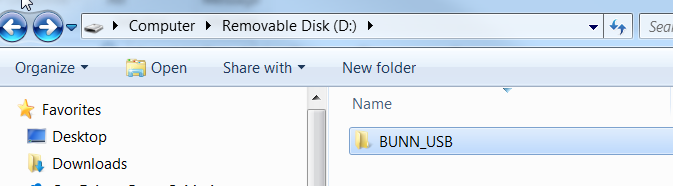
After the file has been unzipped to the desktop, the BUNN_USB folder should be transferred to the root directory of the USB. When complete the directory should look like this:
-
Students mustMark as done
Version 14.00 Release Notes
*Update IO Board first and Restore Defaults when updating*
- Featrue added to extend and customize refill timeout
-